Discovering Tradecraft Garden
Table of Contents

Taking advantage of the recent Black Friday deals, I decided to purchase the CRTL (Certified Red Team Lead) course from ZeroPointSecurity. While the material is dense and deeply technical (typical of Rasta Mouse ), one of the first gems I stumbled upon isn’t hidden behind a paywall. It’s a public project that deserves much more attention from the community: Tradecraft Garden .
Essentially, this repository is a development environment or “playground” designed to drastically simplify the creation of Shellcode and Position Independent Code (PIC) using C and Makefiles.
In this post, we will set up the environment and create a basic example to understand the workflow of this powerful tool.
🛠️ What is Tradecraft Garden?
Tradecraft Garden is a project developed by Raphael Mudge (the creator of CobaltStrike) that solves one of the most common headaches when developing custom implants or loaders: cross-compilation and clean shellcode extraction.
Typically, writing a C payload to be injected directly into memory involves dealing with:
- Stack alignment.
- Dynamic API resolution (parsing the PEB).
- Avoiding absolute addresses.
Tradecraft Garden abstracts this complexity using Mingw-w64 and meticulously structured Make scripts, allowing us to focus purely on the offensive technique.
⚙️ Environment Installation
For this lab, we will use a Linux environment (or WSL on Windows), where these tools shine due to their automation capabilities.
If you are on Windows, open PowerShell as Administrator to install WSL:
wsl --install
Note: You might need to restart your computer after installation.
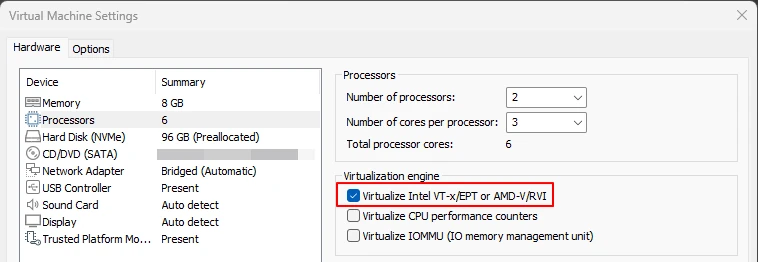
If you are working from a virtual machine, make sure to enable Nested Virtualization. In VMWare, this option is found under Settings > Processors > Virtualize Intel VT-x/EPT or AMD-V/RVI.
Once in the Linux terminal, install the essential dependencies:
sudo apt update
sudo apt install git mingw-w64 nasm make openjdk-11-jdk zip -y
The toolset includes:
- mingw-w64: Cross-compilation suite.
- nasm: x86/x64 assembler, vital for tweaking shellcode.
- make: Build automation.
- openjdk-11-jdk and zip: Support utilities.
⚠️ Critical Windows Defender Configuration
Since we will be compiling artifacts that simulate malware, we must adjust Windows Defender in our development environment to avoid interference:
- Turn off Cloud-delivered protection.
- Disable Automatic sample submission.
- Add an exclusion for the working folder:
C:\tcg. - Add process exclusions for
run.x86.exeandrun.x64.exe.
🧪 Practical Example: Generating a Loader with Crystal Palace
When we program in standard C, the operating system resolves libraries. In the PIC world, this doesn’t happen. This is where Crystal Palace shines.
Instead of manually calculating ROR13 hashes or creating stack strings character by character, the framework allows us to use the MODULE$Function syntax. When processed with a specification file (.spec), the compiler automatically generates the necessary hashes.
📦 Preparation and Compilation
First, organize the files. I created the folder C:\tcg (visible in WSL as /mnt/c/tcg). We need two components that you can download from the official website:
Compile the base examples to generate the necessary objects and DLLs:
cd /mnt/c/tcg/tcg
make clean; make
🔨 Creating Our First PIC
We will use the simple_rdll example. This loader loads a DLL and executes its entry point. For linking, we need:
- Spec File (.spec): Defines the loader construction.
- Payload DLL: We will use a test DLL (“Hello from Hackpuntes”).
- Output: Our final shellcode (
hackpuntes.bin).
Run the linker from the dist folder:
# Syntax: ./link [spec] [payload_dll] [output_bin]
./link ../tcg/simple_rdll/loader.spec ./demo/test.x64.dll hackpuntes.bin
🐚 Testing the Shellcode
To verify functionality without injecting into a complex process, we use the run.x64.exe utility. This tool loads the .bin into memory and jumps to its execution.
# Execute from WSL invoking the Windows executable
./demo/run.x64.exe hackpuntes.bin
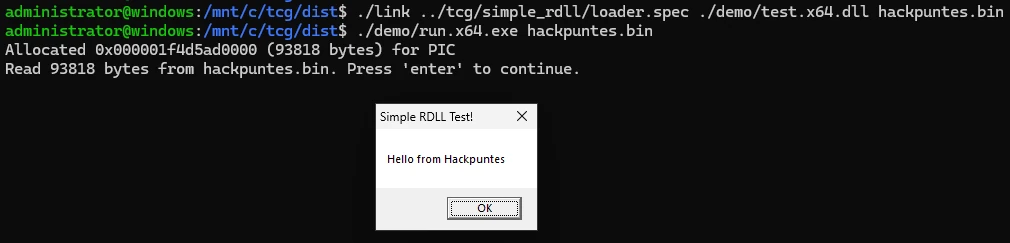
Execution pauses (ideal for attaching a debugger). Upon pressing Enter, the shellcode executes and launches the MessageBox.
🛡️ Execution Guardrails: Advanced Evasion
This is where the technique gets interesting. A malicious user might want their payload to execute only on the specific target machine, preventing analysts or automated sandboxes from detonating the payload.
The simple_rdll_guardrail example implements “Execution Guardrails”. The loader decrypts the payload using a key derived from the environment (in this case, the C: Volume Serial Number). If the key doesn’t match, the payload remains encrypted binary garbage.
🗝️ Obtaining the Environment Key
The run.x64.exe tool helps us get this value if run without arguments:
./demo/run.x64.exe
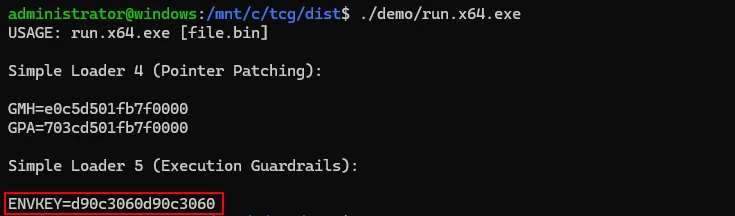
The output shows ENVKEY=d90c3060d90c3060. Copy this value.
🔗 Linking with Environment Variables
We instruct the linker to use that specific key during encryption:
# Pass the specific target environment key
./link ../tcg/simple_rdll_guardrail/stage1.spec ./demo/test.x64.dll hackpuntes_guard.bin ENVKEY=d90c3060d90c3060
Test the execution:
./demo/run.x64.exe hackpuntes_guard.bin
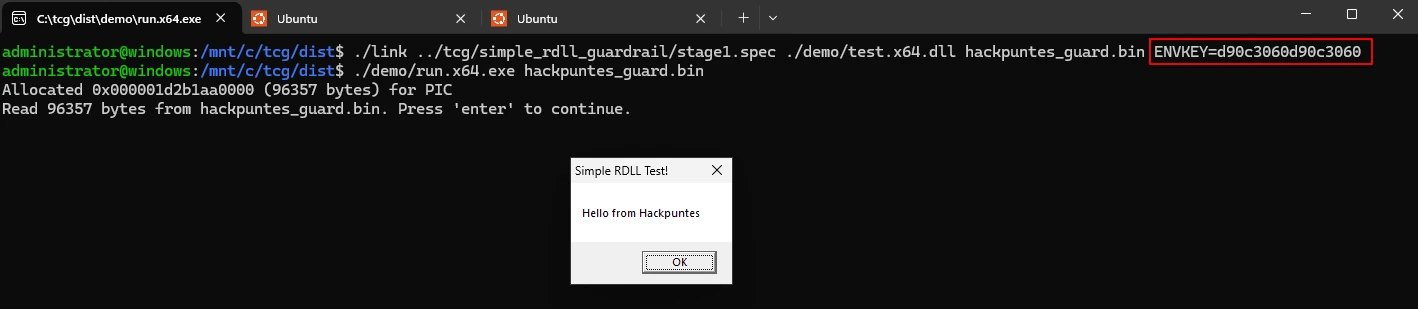
It works perfectly because the Runtime Key matches the Compile Key.
🚫 Failure Simulation (Anti-Sandbox)
What happens if an analyst tries to run this in a different lab? We can simulate this by changing the key when compiling (simulating that the target environment was different):
# Use a fake/different key
./link ../tcg/simple_rdll_guardrail/stage1.spec ./demo/test.x64.dll hackpuntes_guard.bin ENVKEY=d90c3060d90c1337
When executing:
./demo/run.x64.exe hackpuntes_guard.bin

The program reads the bytes, but as the decryption of the next stage fails, it terminates execution silently. No crash, no error message, simply nothing interesting for the analyst.
Conclusion
Tradecraft Garden and Crystal Palace democratize techniques that previously required deep knowledge of assembly and PE structure. The ability to modularize loaders and apply guardrails automatically is an indispensable resource.
I encourage you to explore the source code in the tcg folder, especially the guardrail implementation, to understand how to implement decryption logic in pure C without external dependencies.
Happy Hacking!